
Introduction to abstract syntax trees (AST)
What is an abstract syntax tree?
An abstract syntax tree (AST) is a tree representation of the structure of source code. Each node in the tree denotes a construct occurring in the source code. The abstract means it doesn't represent every detail of the real syntax (like semicolons or parentheses) but focuses on the structural and semantic content.
ASTs are fundamental to how modern JavaScript tools work:
- Linters (e.g. ESLint) - analyze code for errors and style violations
- Formatters (e.g. Prettier) - reformat code consistently
- Transpilers (e.g. Babel) - convert modern JS to backwards-compatible versions
- Bundlers (e.g. Webpack, Rollup) - analyze dependencies and optimize code
- Codemods - automate large-scale code refactoring
Why use AST over regular expressions?
While regex can work for simple text replacements, ASTs provide:
- Structural understanding - know exactly what each piece of code represents
- Reliability - handle edge cases, nested structures, and complex syntax
- Precision - transform only what you intend, avoiding false matches
- Maintainability - easier to understand and extend transformations
Real-world practical use case
I had the take to refactor the writing of the demos for a open source component library called arco.design. The legacy demos used ReactDOM.render with magic container variable to mount components, but I wanted to convert them into self-contained and syntax complete functional components that could be easily rendered in modern frameworks. There are hundreds of such demo files as diffed in this arco-design demo refactor pull request, so doing this manually would be tedious and error-prone. Using AST transformations, I automated this refactor reliably and efficiently. I will walk through the entire process of building this AST transformation step by step.
Before
// Legacy demo code using ReactDOM.render with magic container variable
import { Button, Space } from '@arco-design/web-react'

ReactDOM.render(
  <Space size="large">
    <Button type="primary">Primary</Button>
    <Button type="secondary">Secondary</Button>
    <Button type="dashed">Dashed</Button>
    <Button type="outline">Outline</Button>
    <Button type="text">Text</Button>
  </Space>,
  // Magic variable representing the mount point
  CONTAINER
)
After
// Self-contained functional component with export
import { Button, Space } from '@arco-design/web-react'

const App = () => {
  return (
    <Space size="large">
      <Button type="primary">Primary</Button>
      <Button type="secondary">Secondary</Button>
      <Button type="dashed">Dashed</Button>
      <Button type="outline">Outline</Button>
      <Button type="text">Text</Button>
    </Space>
  )
}

export default App
Building the AST transformation step by step
Let's break down the transformation process into digestible steps.
Babel workflow diagram
source code
  -> @babel/parser: parse to AST
AST
  -> @babel/traverse: find + transform nodes
modified AST
  -> @babel/generator: generate code from modified AST
target code
Install dependencies
First, install the required packages:
npm install @babel/parser @babel/traverse @babel/generator
These three packages work together:
@babel/parser- converts code strings into AST@babel/traverse- walks through and modifies the AST@babel/generator- converts AST back to code
Note: These examples use JavaScript. For TypeScript code transformations, use
@babel/parserwith thetypescriptplugin, or use the TypeScript compiler API directly.
Step 1: Parse the code into an AST
Converting the source code string into a structured tree representation.
const babelParser = require('@babel/parser')

const code = `
import { Button, Space } from '@arco-design/web-react';

ReactDOM.render(
  <Space size="large">
    <Button type="primary">Primary</Button>
    <Button type="secondary">Secondary</Button>
    <Button type="dashed">Dashed</Button>
    <Button type="outline">Outline</Button>
    <Button type="text">Text</Button>
  </Space>,
  CONTAINER
);
`

const ast = babelParser.parse(code, {
  sourceType: 'module', // Enable ES6 imports/exports
  plugins: ['jsx'], // Enable JSX syntax parsing
})
The parser reads the code and creates an AST where each JavaScript construct (imports, function calls, JSX) becomes a node. We specify sourceType: 'module' to support ES6 imports and add the jsx plugin to parse React's JSX syntax.
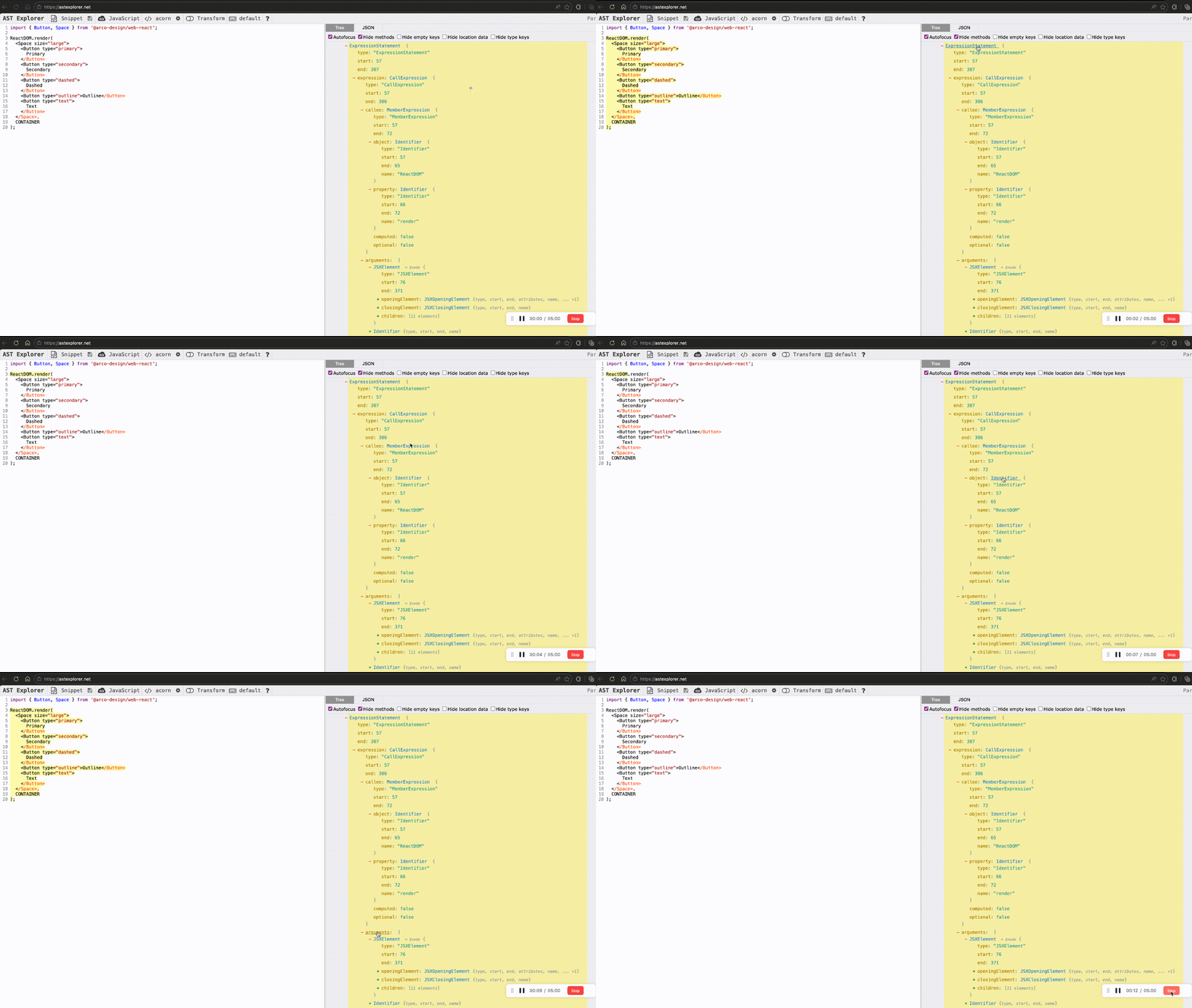
To better understand how the code translates to AST nodes before writing transformations, we can explore the AST structure visually using AST Explorer:
- Visit astexplorer.net
- Paste your code in the editor
- See the live AST visualization
- Hover over nodes to see their types and properties
Step 2: Identify the target pattern
Finding the target ReactDOM.render() calls in the AST.
const traverse = require('@babel/traverse').default

traverse(ast, {
  CallExpression(path) {
    // This visitor runs for every function call in the code
    // Check if this is ReactDOM.render()
    const isReactDOMRender =
      path.get('callee').isMemberExpression() &&
      path.get('callee.object').isIdentifier({ name: 'ReactDOM' }) &&
      path.get('callee.property').isIdentifier({ name: 'render' })

    if (isReactDOMRender) {
      console.log('Found ReactDOM.render call!')
      // We'll transform it in the next steps
    }
  },
})
traverse uses the visitor pattern to walk the AST. Our CallExpression visitor examines every function call. We check if it's a MemberExpression (something like obj.method) where the object is ReactDOM and the property is render.
Step 3: Extract the JSX element
Getting the JSX that's passed to ReactDOM.render().
traverse(ast, {
  CallExpression(path) {
    if (/* ...same checks as above... */) {
      // ReactDOM.render takes the JSX as its first argument
      const jsxElement = path.get('arguments.0').node
      /**
       * Get the first argument of the call expression, which is the JSX element.
       * path.get('arguments.0') navigates to the first argument of the function call
       * .node retrieves the actual AST node representing the JSX element.
       */
      console.log('JSX element type:', jsxElement.type) // JSXElement
    }
  }
})
ReactDOM.render() takes two arguments: the JSX to render and the DOM container. We use path.get('arguments.0') to access the first argument (the JSX), and .node to get the actual AST node.
Step 4: Create the functional component AST
Building the AST nodes for const App = () => { return <JSX> }.
const componentName = 'App'

const component = {
  type: 'VariableDeclaration', // const ...
  kind: 'const',
  declarations: [
    {
      type: 'VariableDeclarator', // App = ...
      id: {
        type: 'Identifier',
        name: componentName,
      },
      init: {
        type: 'ArrowFunctionExpression', // () => { ... }
        params: [],
        body: {
          type: 'BlockStatement', // { ... }
          body: [
            {
              type: 'ReturnStatement', // return ...
              argument: jsxElement, // JSX we extracted earlier at step 3
            },
          ],
        },
      },
    },
  ],
}
We're manually constructing the AST structure for a functional component. Each JavaScript construct has a corresponding AST node type:
VariableDeclarationforconstVariableDeclaratorfor the assignmentArrowFunctionExpressionfor the arrow functionBlockStatementfor the curly bracesReturnStatementfor the return
Step 5: Create the export statement
Building the AST for export default App.
const exportDefault = {
  type: 'ExportDefaultDeclaration',
  declaration: {
    type: 'Identifier',
    name: componentName,
  },
}
An ExportDefaultDeclaration node represents export default. Its declaration field points to what we're exporting—in this case, an Identifier referencing our component name.
Step 6: Modify the program
Removing the old code and adding our new component.
traverse(ast, {
  CallExpression(path) {
    if (/* ...ReactDOM.render checks... */) {
      // Get the root Program node
      const program = path.findParent((p) => p.isProgram())

      // Remove the ReactDOM.render() call
      path.remove()

      // Add the new component in step 4
      program.node.body.push(component)
      // Add the export statement in step 5
      program.node.body.push(exportDefault)
    }
  }
})
We navigate up to the Program node (the root of the AST), remove the ReactDOM.render() call from the tree, and append our new component and export statements to the program's body.
Step 7: Generate the transformed code
Converting the modified AST back to JavaScript code.
const generator = require('@babel/generator').default

const output = generator(ast, {}, code)
console.log(output.code)
@babel/generator traverses the AST and converts each node back into source code. It handles formatting, though it may not match the original exactly.
Output:
import { Button, Space } from '@arco-design/web-react'

const App = () => {
  return (
    <Space size="large">
      <Button type="primary">Primary</Button>
      <Button type="secondary">Secondary</Button>
      <Button type="dashed">Dashed</Button>
      <Button type="outline">Outline</Button>
      <Button type="text">Text</Button>
    </Space>
  )
}

export default App
Complete solution
Now that we understand each step, here's the complete transformation in one cohesive script:
const babelParser = require('@babel/parser')
const traverse = require('@babel/traverse').default
const generator = require('@babel/generator').default

const code = `
import { Button, Space } from '@arco-design/web-react';

ReactDOM.render(
  <Space size="large">
    <Button type="primary">Primary</Button>
    <Button type="secondary">Secondary</Button>
    <Button type="dashed">Dashed</Button>
    <Button type="outline">Outline</Button>
    <Button type="text">Text</Button>
  </Space>,
  CONTAINER
);
`

// Parse the code into an AST
const ast = babelParser.parse(code, {
  sourceType: 'module',
  plugins: ['jsx'],
})

// Transform the AST
traverse(ast, {
  CallExpression(path) {
    // Find ReactDOM.render() calls
    if (
      path.get('callee').isMemberExpression() &&
      path.get('callee.object').isIdentifier({ name: 'ReactDOM' }) &&
      path.get('callee.property').isIdentifier({ name: 'render' })
    ) {
      const componentName = 'App'
      const jsxElement = path.get('arguments.0').node

      // Create functional component: const App = () => { return <JSX> }
      const component = {
        type: 'VariableDeclaration',
        kind: 'const',
        declarations: [
          {
            type: 'VariableDeclarator',
            id: { type: 'Identifier', name: componentName },
            init: {
              type: 'ArrowFunctionExpression',
              params: [],
              body: {
                type: 'BlockStatement',
                body: [
                  {
                    type: 'ReturnStatement',
                    argument: jsxElement,
                  },
                ],
              },
            },
          },
        ],
      }

      // Create export: export default App
      const exportDefault = {
        type: 'ExportDefaultDeclaration',
        declaration: { type: 'Identifier', name: componentName },
      }

      // Modify the program
      const program = path.findParent((p) => p.isProgram())
      path.remove()
      program.node.body.push(component)
      program.node.body.push(exportDefault)
    }
  },
})

// Generate transformed code
const output = generator(ast, {}, code)
console.log(output.code)
Common AST node types reference
When working with JavaScript ASTs, you'll frequently encounter these node types:
| Node Type | Represents | Example |
|---|---|---|
Program | Root node containing all code | (entire file) |
ImportDeclaration | Import statements | import React from 'react' |
ExportDefaultDeclaration | Default exports | export default App |
VariableDeclaration | Variable declarations | const x = 1 |
FunctionDeclaration | Function definitions | function foo() {} |
ArrowFunctionExpression | Arrow functions | () => {} |
CallExpression | Function calls | foo() |
MemberExpression | Property access | obj.prop |
Identifier | Variable/function names | myVariable |
JSXElement | JSX tags | <div>...</div> |
BlockStatement | Code blocks | { ... } |
ReturnStatement | Return statements | return value |
Best practices
When working with AST transformations, follow these guidelines:
- Test thoroughly - AST transformations can have subtle edge cases; write comprehensive tests, and test with various code patterns including nested structures, comments, and unusual formatting
- Handle errors gracefully - Wrap transformations in try-catch and validate inputs before processing
- Start simple - Experiment in AST Explorer before writing transformation code. Always validate your assumptions about the AST structure before transforming
- Document intent - AST code can be complex; add comments explaining what each transformation does
Further resources
- AST Explorer - Interactive AST visualization
- Babel Plugin Handbook - Deep dive into Babel plugins
- jscodeshift - Higher-level codemod toolkit from Facebook
Conclusion
ASTs unlock powerful code transformation capabilities that go far beyond what regular expressions can achieve. While the learning curve is steeper, the reliability, precision, and maintainability make ASTs the professional choice for any serious code manipulation task. Start exploring ASTs with simple transformations, and you'll quickly discover how they can automate tedious refactoring tasks and ensure consistency across your codebase.